Exploring some emerging toolings that enable developers to build and deploy LLM-based applications
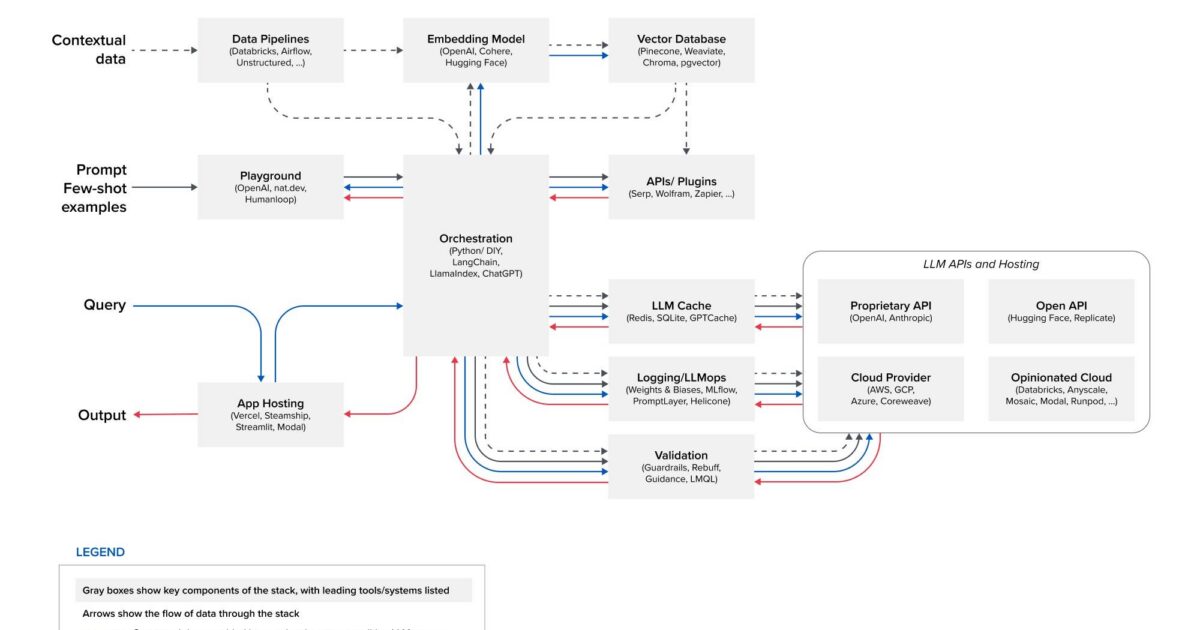
In this series, we’re exploring different technologies that make it possible for developers to successfully build and deploy LLM-backed applications. In this post, we will delve deeper into embedding models and vector databases. What they are, what role they play in the technology stack, and some of the emerging technologies in the space.
A Quick Recap of the Previous Post
In the previous post, we explored playground and app hosting. Playgrounds just as the name suggests in the context of AI platforms typically refer to interactive and user-friendly environments where users can experiment with and explore various aspects of an AI product. These playgrounds let individuals engage with AI technologies without requiring extensive technical expertise.
App hosting platforms provide hosting infrastructure for developers to deploy their LLM applications. The common theme among emerging hosting providers like Vercel, Steamship, Streamlit, and Modal discussed in the previous article is their ability to offer a simplified interface for deploying LLM apps. This allows developers to concentrate on the LLM app, rather than investing time on handling hardware infrastructure.
The previous article is optional for this one but I would suggest that you read it as well to get to know more about the other technologies that make up the emerging LLM stack. https://blog.gopenai.com/a-deep-dive-into-a16z-emerging-llm-app-stack-playgrounds-and-app-hosting-bf2c9fe7cf18
Embedding Model
What is an embedding? An embedding, in the context of machine learning, is a numerical representation of text, image, audio, etc, that captures the semantic relationship or meaningful relationships and patterns of what is being embedded.
Why are text, images, and audio converted into numbers? Machine learning models can only handle numbers. Most of the generation from these models is done by running the input through some neural network which consists of layers of mathematical operations. So if you ask ChatGPT a question, it takes the plain text in human language, converts it to numbers, runs it through its transformer model, gets some numbers as a result, and then converts the number back to a human-readable form.
The ability to convert inputs into numerical representations allows for the generalization and learning of intricate patterns and features in the data.
So embeddings are a bunch of numbers and that’s it? Yes and no. True, embeddings are a bunch of numbers but not just any random numbers. These numbers carry some semantic and contextual information in them such that in natural language processing, two related sentences, their embeddings, or their numeric representation will be closer to each other than the ones that are not related.
Google Search uses embeddings to match text to text and text to images; Snapchat uses them to “serve the right ad to the right user at the right time”; and Meta uses them for their social search.
Embedding models are models that can be used to convert texts, images, audio, etc into a numeric form while retaining the contextual relationship. These models are trained to use various techniques to learn meaningful patterns and relationships within the data and encode them in a continuous vector space. A continuous vector space is like a big playground where each embedding is a point in this playground, and points that are closer to each other show that the embeddings are related.
Emerging technologies in this space.
Hugging Face: On Hugging Face you can find lots of pre-trained models for text embedding and in a few lines of code you will be able to convert a bunch of text inputs into embeddings.
import requests

model_id = "sentence-transformers/paraphrase-MiniLM-L6-v2"
hf_token = "Your Hugging Face Token"
api_url = f"https://api-inference.huggingface.co/pipeline/feature-extraction/{model_id}"
headers = {"Authorization": f"Bearer {hf_token}"}

def query(texts):
    response = requests.post(api_url, headers=headers, json={"inputs": "Some text here", "options":{"wait_for_model":True}})
    return response.json()

text_to_embed = ["How do I get a replacement Medicare card?"]
output = query(texts)
Cohere: Embed v3 is Cohere’s most advanced and state-of-the-art embedding model. The distinguishing feature of Embed v3 lies in its capacity to assess the alignment between a query and a document’s subject matter, gauging the overall content quality. Consequently, it can effectively prioritize top-ranking documents of the highest quality, proving particularly advantageous in managing datasets with a high level of noise. This implies that with Embed v3, the embeddings generated play a crucial role in ensuring that when a search query is executed, the resulting output consists of the most relevant information. It is the embedding model’s representations that contribute to this precision, ensuring the returned result aligns closely with the query rather than being merely similar.
The code below shows how to use the Embed v3 embedding model.
import cohere
import numpy as np

cohere_key = "Your API Key"
co = cohere.Client(cohere_key)

docs = ["The text you want to get the embedding"]

#Encode your documents with input type 'search_document'
doc_emb = co.embed(docs, input_type="search_document", model="embed-english-v3.0").embeddings
doc_emb = np.asarray(doc_emb)
OpenAI: Most of us are very familiar with ChatGPT except you live under a rock. OpenAI also has an embedding model, the text-embedding-ada-002. You can easily get an embedding by sending your text string to the embeddings API endpoint. This returns a list of embedding objects which you can then use for semantic search.
from openai import OpenAI
client = OpenAI()

response = client.embeddings.create(
    input="The text you want to embed",
    model="text-embedding-ada-002"
)

print(response.data[0].embedding)
Vector Database
What is a vector? A vector is a list of numbers like [30, 20, 40, 15] and these numbers are attributes of a particular item. For example, a vector representation of an item can be:
Person vector = [height, weight, age]
example: [ 175 cm, 70 kg, 35]
Building vector = [height, width, depth, construction year]
example: [30, 20, 40, 2000]
Car vector = [price, year, mileage]
example: [40000, 2022, 30000]
In the case of the person vector, you can think of the vector as residing in a three-dimensional space, where each dimension corresponds to a specific attribute (height, weight, age). If you add more attributes, each new attribute becomes an additional dimension in the space.
So a vector database should mean a database for storing vectors? In its simplest meaning, a vector database is a type of database designed specifically for storing and efficiently retrieving vectors.
The primary purpose of a vector database is to provide a mechanism for organizing and querying vectors based on their similarity or other criteria. This makes vector databases particularly useful in applications such as similarity searches, recommendation systems, and information retrieval tasks, where the comparison and retrieval of vectors are essential.
Hmm… So the definition of embedding kinda looks similar to vectors. Are they the same? Yes, in machine learning, embeddings are often represented as vectors. So this implies that a vector database is used for storing embeddings.
Emerging technologies in this space.
Pinecone: Pinecone is a powerful cloud-based vector database service designed to streamline the storage, indexing, and retrieval of high-dimensional vector data. Pinecone provides scalable solutions for managing vast datasets, making it a robust choice for machine learning, recommendation systems, and similarity search applications.
Components of Pinecone Database:
- Index: The index is a data structure that enables efficient searching and retrieval of vectors. It is optimized for high-dimensional data, allowing for fast querying even in large datasets.
- Namespaces: Pinecone uses namespaces to organize and group vectors. Namespaces act like containers, allowing the separation of different sets of vectors within the same Pinecone environment.
- Vectors: Vectors are the core representation of data in Pinecone. These vectors are mathematical entities encapsulating the features or characteristics of data points in a multidimensional space.
Pinecone is a fully managed vector database that doesn’t require developers to manage infrastructure or tune vector-search algorithms. Getting started requires just a few clicks, and no expertise in machine learning is necessary for developers.
Weaviate: Weaviate is an open-source vector database. It allows you to store data objects and vector embeddings, providing the capability to retrieve them through similarity measures.
Components of Weaviate Database:
Schema: The schema is a fundamental component in Weaviate. The schema defines how data is stored, organized, and retrieved in Weaviate. It defines the class property structure, including classes, properties, data types, and vectorization settings. The schema serves as a blueprint for organizing and structuring the data stored in Weaviate.
Modules: Weaviate has optional modules that can be used based on the functionality required by the user. Weaviate without any modules attached is a pure vector-native database. Modules can then be added to extend its functionality. Examples of modules include Vectorizer modules, like the text2vec, multi2vec, or img2vec modules that transform data into vectors. Ranker modules, like the rerank modules, rank the results. Reader modules like qna-transformers is used to extract answers from retrieved documents, while the Generator module uses language generation to generate an answer from the given document. Weaviate also supports custom modules as well.
Chroma DB: Chroma is an open-source vector database for building AI applications with embeddings. Unlike other vector databases like Pinecone and Weaviate which are cloud-native, Chroma is self-hosted. Chroma doesn’t provide hosting services currently but is working on providing a hosting service soon. You can join the waitlist on their site.
Components of Chroma DB:
Collection: Collection is the main component of Chroma DB. A collection is like a table in a relational database. Collections are where you’ll store your embeddings, documents, and any additional metadata.
When you create a collection, you pass your text, metadata, and ID, by default, Chroma converts the text into the embeddings using all-MiniLM-L6-v2, but you can choose another embedding model, and then store it.
Then you can query the collection by text or embedding to receive similar documents. You can also use filters to return results based on certain conditions.
pgvector: pgvector is a PostgreSQL extension that enables you to both store and query vector embeddings within your database. PostgreSQL, often referred to as “Postgres,” is an open-source relational database management system (RDBMS). It is widely used for various purposes due to its robust features.
When we say that pgvector is an extension of PostgreSQL, it means that pgvector is a supplementary module that adds new features and capabilities to the PostgreSQL database system. pgvector enhances PostgreSQL’s capabilities by enabling the storage, retrieval, and manipulation of vector embeddings.
Components of pgvector:
Vector: Vector is a data type in pgvector that represents a high-dimensional vector. You can create a column that is of type vector and use it to store your vector data.
Operators: pgvector has several operators that are used to perform various vector operations within SQL queries. pgvector arithmetic operators include:
- (-) element-wise subtraction
- (+) element-wise addition
- (*) element-wise multiplication.
Operators that can be used to calculate similarity
- <-> Euclidean distance
- <#> Negative inner product
- <=> Cosine distance
Indexing: pgvector supports two indexes for nearest neighbor search. A Flat Index with Inverted File (IVFFlat) partitions vectors into lists, subsequently searching within a subset of those lists closest to the query vector. The Hierarchical Navigable Small Worlds (HNSW) index constructs a multi-layered graph where nodes represent vectors, and links denote distances. Locating the nearest neighbors involves navigating through the graph, and searching for shorter distances along the way.
Conclusion
Embeddings and vector databases provide huge benefits due to their use cases from enabling efficient search for recommender systems and helping in anomaly detection systems, to serving as a long-term memory for LLMs, to storing visual contents as high dimensional vectors that can be used in image and video recognition to capturing meaning in words for NLP applications.
The importance of embeddings and vector databases for building powerful AI systems cannot be overstated and will continue to enable developers to create better systems.
Please don’t forget to give this article 50 claps and follow me to get more content like this.
Sources used in the article
- https://platform.openai.com/docs/guides/embeddings
- https://cohere.com/embeddings
- https://huggingface.co/blog/getting-started-with-embeddings
- https://tembo.io/blog/vector-indexes-in-pgvector
- https://www.cloudflare.com/learning/ai/what-is-vector-database/
- https://weaviate.io/developers/weaviate
- https://docs.trychroma.com/usage-guide
- https://github.com/pgvector/pgvector#hnsw
- https://docs.pinecone.io/
Related: how RAG uses embeddings and a16z emerging LLM app stack.