RAG — Retrieval Augmented Generation — is how modern AI systems access data they were never trained on. I spent the last three months building RAG systems in production, and this is what I wish someone had told me from day one about Retrieval Augmented Generation.
RAG and Retrieval-Augmented Generation: The One-Sentence Summary
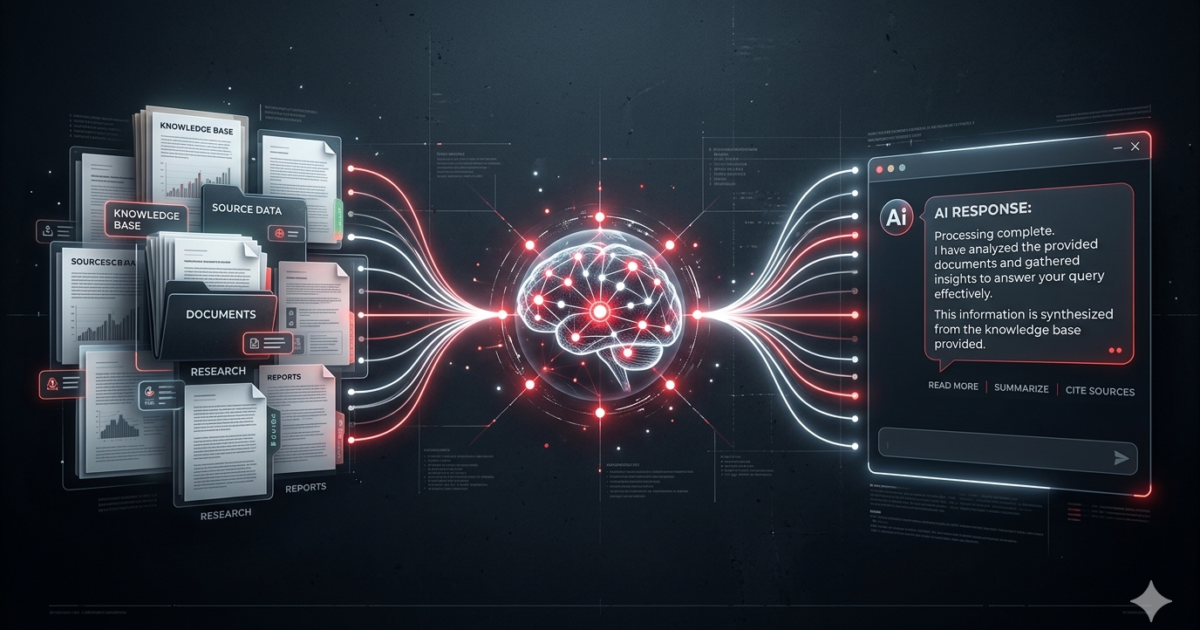
RAG is how you give an LLM access to information it wasn’t trained on — your company docs, your PDFs, your database — so it can answer questions about them without hallucinating.
If you’ve ever pasted a document into ChatGPT and asked questions about it, you’ve used the basic idea of RAG. But the real power comes when you build it properly.
Why RAG Suddenly Matters More Than Fine-Tuning
When LLMs first exploded, everyone thought fine-tuning was the answer. Take your data, train the model on it, boom — your custom AI.
Turns out, fine-tuning is expensive, brittle, and a pain to update. If your data changes tomorrow, you retrain everything.
RAG flips that model. Instead of teaching the model your data, you just give it the relevant data at query time. The model stays the same. Your knowledge base stays dynamic.
This isn’t theory — it’s how every major AI product works under the hood. ChatGPT browsing the web? RAG. Claude with projects? RAG. Perplexity answering questions with citations? All RAG.
How RAG Actually Works (The Three Steps)
I’m going to skip the academic definitions and tell you what happens under the hood when you ask a RAG system a question.
Step 1: Ingestion (The Part Nobody Talks About)
Before any question gets answered, you need to get your data into the system. This is where most projects fail.
You start with your source documents — PDFs, Word files, web pages, whatever. Here’s the thing nobody tells you: your documents are probably garbage for RAG out of the box.
I learned this the hard way. My first attempt involved throwing 200 PDFs into a vector database and expecting magic. What I got was garbage responses because:
- PDFs had headers and footers that polluted every chunk
- Tables were unreadable
- References and footnotes got mixed into the wrong chunks
- The document structure meant nothing to the chunking algorithm
The solution is proper preprocessing. Strip headers and footers. Extract tables separately. Handle figures and captions. Split by semantic boundaries, not just character count.
For chunking, I settled on 512 tokens with 128 token overlap after testing a dozen different configurations. It’s not perfect for everything, but it’s a solid starting point.
Step 2: Embedding and Storage
Once your documents are cleaned and chunked, each chunk gets converted into a vector embedding — a list of numbers that represents its meaning. Similar chunks end up with similar vectors.
You need two things here:
An embedding model to create the vectors. OpenAI’s text-embedding-3-small is the default choice and works fine for most use cases. But if you’re handling sensitive data locally, models like BAAI/bge-base-en-v1.5 from Hugging Face run on consumer hardware and produce good results.
A vector database to store and search them. I’ve used several:
- Pinecone — easiest to set up, managed, expensive at scale
- Weaviate — good middle ground, runs self-hosted or cloud
- ChromaDB — simplest for experimentation, runs locally
- pgvector — if you’re already on PostgreSQL, just add this extension
For production, I lean toward Weaviate or pgvector. For prototyping, ChromaDB is unbeatable.
Step 3: Retrieval and Generation
Now the actual user asks a question. Here’s what happens:
1. The question gets converted into a vector using the same embedding model
2. The vector database finds the most similar chunks (usually 3-10)
3. Those chunks get stuffed into a prompt template along with the question
4. The LLM generates an answer using only those chunks as context
That’s it. The entire RAG pipeline in four bullet points.
But the magic is in the details of step 3. How you construct that prompt matters enormously.
The Things Nobody Tells You About RAG
Chunk Quality > Retrieval Quality
Most people obsess about retrieval accuracy. They try different vector databases, different distance metrics, different embedding models. Meanwhile, their chunks are terrible.
If your chunks cut halfway through a sentence, start mid-explanation, or mix unrelated topics, no retrieval system can save you. Fix your chunks first. Everything else is optimization.
Metadata Is Your Secret Weapon
Pure vector search is powerful but blind. Consider these two scenarios:
Search: “What’s our return policy for electronics?”
Without metadata: The vector search finds chunks about the return policy, but it also finds chunks about general customer support, warranty information, and shipping policies. It returns a mix.
With metadata: You filter by category = “returns” and document_type = “policy” before the vector search even runs. Now you get only the relevant chunks.
Always store metadata. It’s the difference between a mediocre RAG and a good one.
Hybrid Search Beats Pure Vector Search
Vector search is great at finding semantically similar content, but it’s terrible at exact matching. If someone searches for “Error code 404,” a vector search might return chunks about 403 errors or general HTTP status codes.
Hybrid search combines vector similarity with keyword matching (BM25). It catches exact matches that vector search miss. Most vector databases support this now. Use it.
Re-ranking Changes Everything
The standard approach returns 10 chunks. Maybe 3 are gold, 3 are decent, and 4 are noise. The LLM will confidently use all of them, including the noise.
Re-rankers solve this. They take your initial results, score them more carefully, and keep only the best ones. Cohere has a good re-ranker API. Cross-encoder models from Hugging Face work well for self-hosted setups.
After adding re-ranking to my pipeline, response quality went up noticeably. It’s one of the highest-impact changes you can make.
A Practical RAG Architecture
Here’s what I actually run in production now:
User Query → Query Transformation → Hybrid Search (Vector + BM25)
                                    ↓
                              Vector Database
                                    ↓
                            Re-ranker (top 5)
                                    ↓
                            Prompt Construction
                                    ↓
                              LLM Generation
                                    ↓
                            Answer + Citations
The query transformation step is worth explaining. Raw user queries are often terrible for retrieval. “Tell me about stuff” doesn’t produce good vector search results.
I send the user’s question to a small, fast LLM first and ask it to: reformulate the query for search, expand abbreviations, and extract key entities. The result goes to the vector database. This alone improved retrieval quality by a lot.
RAG (retrieval-augmented generation) works best when combined with the right storage layer. For the vector database layer in RAG retrieval-augmented generation pipelines, see our dedicated vector database guide. If you’re comparing RAG retrieval augmented generation against model customization, our guide on fine-tuning an LLM explains when training beats retrieval.
The original RAG paper by Lewis et al. (2020) is the academic foundation of retrieval-augmented generation — worth reading to understand the original design intent.
When Not to Use RAG
RAG isn’t always the answer.
If your knowledge base is a single 10-page document, you don’t need a vector database. Just put the whole thing in the context window. Modern LLMs can handle 100K+ tokens.
If you need the model to deeply understand a domain (legal reasoning, medical diagnosis), RAG helps but fine-tuning might be necessary too. The best systems use both — RAG for factual grounding, fine-tuning for domain expertise.
If your data changes every five minutes, you need real-time indexing. Most vector databases can handle this, but your ingestion pipeline needs to be designed for streaming, not batch processing.
The Bottom Line
RAG is the most practical way to build AI applications that know your data. It’s not perfect, but it works well enough to be useful today.
Start simple. Get one document working end-to-end. Then add chunking improvements, then metadata, then hybrid search, then re-ranking. Each step compounds.
And don’t let the perfect be the enemy of the good. My first RAG pipeline was a Python script with ChromaDB that worked on a single PDF. It was ugly. It worked. And it taught me everything I needed to build the real thing.
Related: how RAG gets its facts straight and what is a vector database.