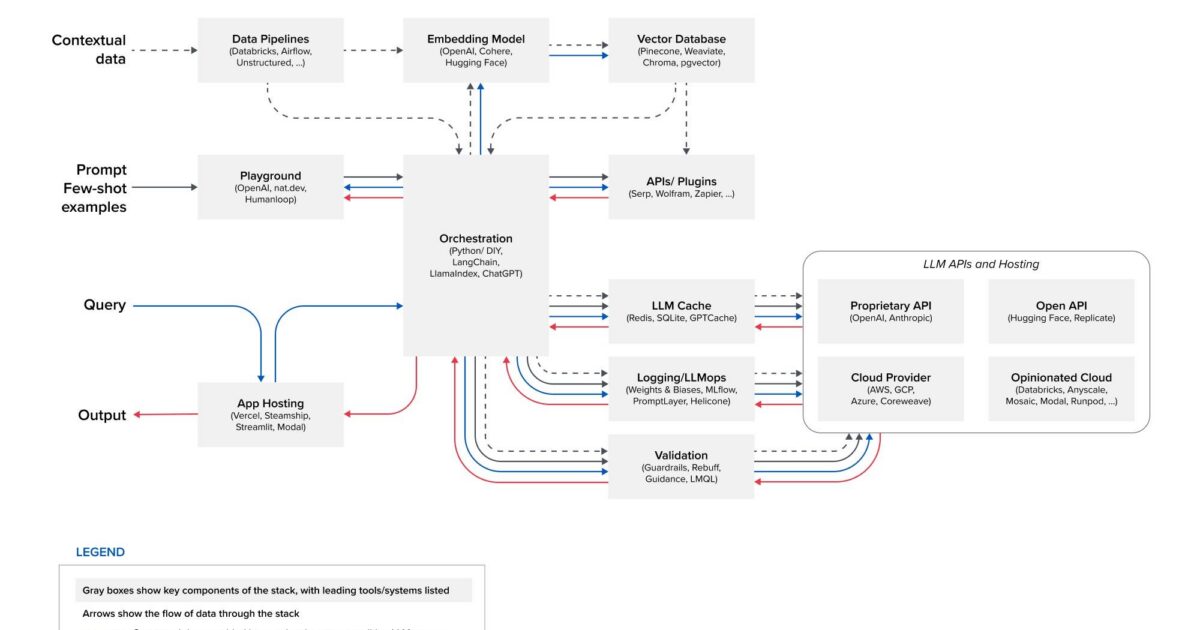
Exploring some toolings that enable developers to build and deploy LLM-based applications.
Large language models are new and are marked by their continuous and accelerated growth, with groundbreaking advancements and innovations emerging at a pace that people trying to catch up often slip and fall behind. It is important to highlight some of the toolings that are available in the LLM ecosystem that provide the functionality that users want because it is often assumed or perceived that the model is the application and provides all the capabilities that users want.
The figure above was created by Andreessen Horowitz, and in a post titled Emerging Architectures for LLM Applications, they showed, in their word, “most common systems, tools, and design patterns we’ve seen used by AI startups and sophisticated tech companies. They also mentioned that the app stack may change substantially because the LLM space is fast evolving.
This app stack is based on in-context learning. In-context learning entails taking a model with general language understanding and refining its expertise in a targeted field. In the case of the LLM, this involves adjusting its language patterns, recognizing domain-specific terminology, and honing its ability to comprehend and generate content relevant to the domain of interest. A good analogy would be, you take a student and provide the student with lots of domain-specific data, and by engaging the data the student’s understanding of that domain is refined and improved.
We are going to do a deep dive and explore some of the categories in this stack and gain a better understanding of how they fit into the overall ecosystem.
Playgrounds
Playgrounds are interfaces that allow you to experiment with an application to see how it works. It’s commonplace in most large language applications nowadays. This could be going to ChatGPT, putting in a prompt, and getting a response. It’s a starting point for lots of people into the large language model world. Like the Assembly AI playground which allows you to upload an audio file and it transcribes the audio and provides the transcript. Humanloop has its playground where you can play around with prompts and parameters and when you feel it’s okay for your use case, you can then integrate it into your project.
Playgrounds are ubiquitous these days and are mostly easy-to-use interfaces. Most playgrounds are also browser-based, which means that most provide you with the resources like GPU needed to try out the product.
App Hosting
Local Hosting
Hosting your LLM app on your machine is the easiest and most cost-effective way of app hosting. It allows you to tinker with your app and make changes to it fast.
- Cost: Running your LLM app on your machine is entirely free. The only cost associated with that is just the money spent on purchasing and maintaining your system.
- Ease of use: Deploying and running LLM on your machine is effortless in most cases, and doesn’t require any specialized skill. With a few commands, your app will be up and running.
- Access: The LLM app is just sitting there on your local machine so you can easily make any changes to it, but it also means that you are the only one that can use it.
- Latency: Depending on the LLM; running some LLM on the local machine can have low latency while from my own experience running the OpenAI Whisper model on my system takes a longer time for response if given a large audio file but has lower latency, compared to using OpenAI Whisper API, if given a short audio file.
Local hosting serves as a viable choice solely in the developmental phase. Once ready to transition the application to the production stage, alternative hosting methods become necessary.
Self Hosting
Self-hosting is deploying and managing your application on your infrastructure. Many organizations are deploying self-hosted LLM apps due to several reasons:
- Security & Privacy: The most prominent reason for self-hosting is security and privacy. Self-hosting allows total oversight of your data especially if you’re dealing with sensitive data. You wouldn’t want your data going out of your organization where they could be included in the training data for LLM models as in the case of OpenAI. OpenAI’s Terms of Use states that they may use “Non-API Content” to improve their services, meaning if you put any information into ChatGPT it could used to train and improve their services. This implies that ChatGPT can generate an output to a user based on what you gave as input.
- Control: Self-hosting your model means that you have total control of your application. Your team manages infrastructure, you’re not dependent on an external team and your team will be swift to respond in the case of a downtime. You also have control of the open-source LLM model and can make changes to it to fit perfectly to your use case.
Although self-hosting has some benefits, there are certain considerations before choosing between self-hosting your LLM application and using already-hosted LLMs through API calls like OpenAI APIs.
- Cost: Being that LLM models require high computational power, GPUs are always the best fit. If you’re looking to deploy an LLM app that can compete with GPT-3 or GPT-4 in terms of performance then the GPU cost will be very significant.
- Quality: Although there have been great strides made in developing open-source LLMs the best-performing LLMs still lag behind close-source LLMs like GPT-4.
Emerging App Hosting Products
Vercel is a cloud platform-as-a-service company that focuses on providing seamless and efficient deployment for web applications. Platform-as-a-Service companies provide the hardware and software for users to build and manage their applications. It allows developers to focus on their code and not on maintaining and managing infrastructure.
Vercel makes deploying the front end of your application seamless. You can deploy an AI app in seconds on Vercel, using their pre-built templates. It allows a developer to quickly and easily jumpstart their LLM app. They also offer a free service that a developer can use to play around with the platform before committing to a paid plan.
Steamship is a platform for building AI Agents. It’s designed to be simple but powerful enough to build complex agents.
In the context of LLM, an AI Agent is an LLM-powered application that applies its understanding of natural language in reasoning through a problem to achieve a predefined goal.
LLM-powered AI agents can be employed to automate responses to customer queries ensuring 24/7 support. Can also be used by content creators to generate articles and social media content.
Steamship SDK enables developers to build agents in Python, and easily deploy them to the cloud without worrying about the underlying infrastructure or endpoint deployment. You can also use their free plan to test the product.
Streamlit is an open-source Python library that makes it easy build and to turn data scripts into web apps. It lets you quickly build a front-end for your LLM project and deploy it as well.
You don’t need to have prior front-end experience to start building apps with Streamlit. It enables developers to concentrate on their primary focus — the LLM model they are currently working on. With just two commands, you can build your first web. It’s that easy.
pip install streamlit

streamlit hello
Streamlit Community Cloud lets you deploy your LLM apps in a few steps. There is an App Gallery where you can clone an app and deploy it in case you don’t have one already. Your app code and dependencies need to be on GitHub before you deploy your app because Streamlit Community Cloud launches apps directly from your GitHub repo. Once deployed you will have a random URL that you can share with others. But you can always change to a custom subdomain.
Modal allows developers to run code in the cloud without having to configure or set up the necessary infrastructure. It lets you run code in the cloud without having to think about scaling out, scheduling, containerization, using GPUs, and all kinds of other cloud-related stuff.
Modal takes the code on your local machine, moves it to the cloud, executes it in the cloud in a container, and returns an output to your local machine. So you don’t have to build a container, push it to the cloud, go into the cloud console, trigger the job, and download logs. Modal abstracts away all these complexities hereby improving the feedback loop to be the same as working on your local machine.
Getting started with Modal is easy.
pip install modal
modal token new
You use pip to install the Modal client library, with its dependencies on your computer. The second command creates an API token. Then write some code, then use:
modal run get_started.py
To execute it on a remote worker.
The common theme across these apps is their ability to provide a high-level abstraction of the technologies that are needed to build and deploy LLM apps, allowing the developer to focus more on the code, not on things like spending time building interfaces and managing hardware infrastructure. They provide a clean interface for using an LLM application. And they are easy to use. In the AI world where things are constantly changing, and it’s very hard to keep up with things, the need to have tools that shorten the time between building and deployment of LLM applications cannot be overstated.
I hope I provided you with some value through this exploration and I will continue to do a deep dive into the remaining stack, so definitely watch out for my upcoming articles.
Related: embedding models and vector databases.