I Built a Multi-Agent Research Pipeline With Perplexity + Claude + n8n — Here’s My Exact Setup
Quick answer: A multi-agent research pipeline connects Perplexity (web search agent) to Claude (analysis and synthesis agent) through n8n (workflow automation). It runs in about 12 minutes, costs roughly $0.30 per run, and produces a structured research memo on any topic you give it. I built it to stop wasting hours on manual research for deep-dive topics.
Introduction
I was stuck in a loop I could not break. Every time I needed to research a new topic — competitor analysis, a technical concept, a market trend — I would open 15 browser tabs, skim 20 articles, copy fragments into a document, and then try to weave it all into something coherent. The process took two to three hours. And I had to do it again for every new topic.
I knew each piece of the puzzle existed. Perplexity could search the web and summarize sources. Claude could analyze long documents and produce structured writing. n8n could glue APIs together. But I had not seen anyone wire all three into one autonomous research loop.
So I built it. This article walks through exactly what I did: the architecture, the prompts I used, what worked on the first run, what broke, and how you can set this up yourself in under an hour.
Why Perplexity, Claude, and n8n?
Perplexity handles the research phase. Its online LLM searches the web in real time, reads multiple sources, and returns answers with citations. I use the Perplexity API (Sonar Pro model) which returns 10 to 15 cited sources per query. That replaces the tedious open-tabs-and-skim workflow. One API call gives me a researched answer with links I can verify.
Claude handles the analysis and writing phase. I feed Claude the raw Perplexity output and ask it to produce a structured memo. Claude Opus handles long context windows well (200K tokens), which matters when the Perplexity output runs 5,000 to 8,000 words. Claude also follows formatting instructions more reliably than other models I have tested. It respects word limits, uses headings, and cites sources without me having to chase it.
n8n is the glue. I run n8n self-hosted on a $10 VPS. n8n connects the two APIs with HTTP Request nodes, stores intermediate results, and handles error retries. I did not want to write custom Python glue code or manage queue infrastructure. n8n gives me a visual workflow I can edit, pause, and restart without touching code.
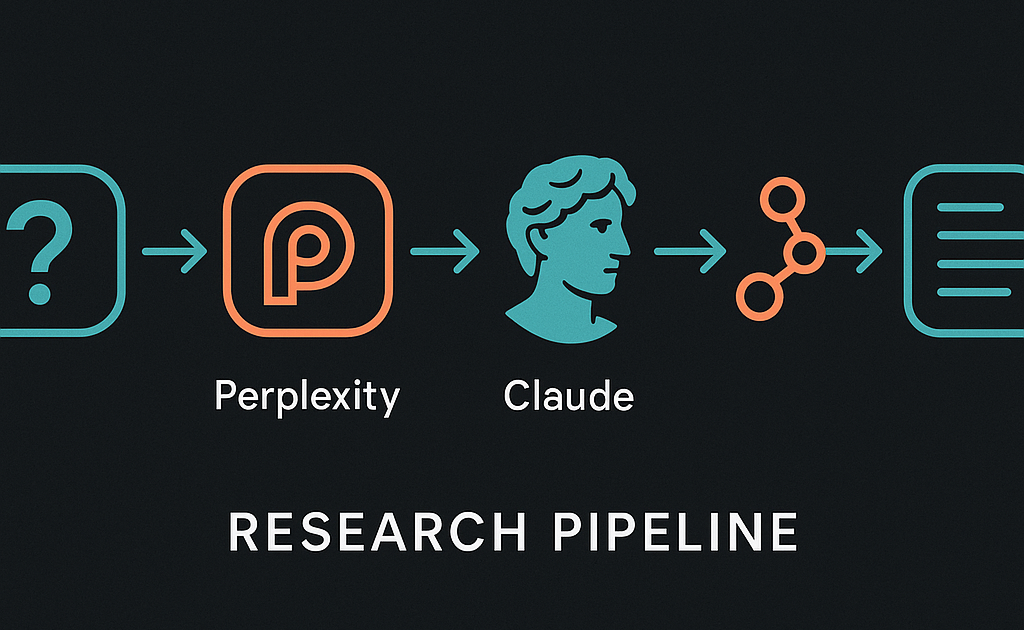
Each tool does one thing well. Perplexity searches. Claude synthesizes. n8n orchestrates. Together they automate a task that used to cost me two hours of focused attention.
How the Pipeline Works
The pipeline runs as a five-step sequence inside a single n8n workflow. Here is the exact flow:
- Manual trigger with a topic. I pass a research topic as a JSON payload. n8n accepts this via a Webhook node or a manual workflow trigger.
- Perplexity fetches the research. The HTTP Request node calls the Perplexity API endpoint with the Sonar Pro model. The system prompt tells Perplexity to act as a research assistant and search for recent, high-quality sources.
- n8n stores the raw output. The response passes through a Set node that extracts the answer text and citation URLs into separate fields. This intermediate storage matters for debugging.
- Claude synthesizes the memo. A second HTTP Request node calls the Anthropic Messages API. The system prompt is a detailed analysis template. I set max_tokens to 8192 to give Claude room to write a proper memo.
- Output lands in a document. The final step writes the Claude output to a Google Doc or saves it as a markdown file.
The whole workflow takes 10 to 14 minutes. Perplexity takes about 40 seconds. Claude takes 6 to 10 minutes for the long synthesis.
The Prompts I Used
The Perplexity prompt asks for breadth and citations. I tried short prompts first and got shallow answers. This version works much better:
System: You are a research assistant. Search for the most recent and authoritative sources on the user's topic. Prioritize academic papers, official documentation, and reputable industry analysis from the past 12 months. Return a comprehensive answer with at least 8 cited sources. Include direct quotes where relevant. Group findings by subtopic. End with a list of open questions or conflicting findings.

User: Research this topic in depth: [TOPIC]. Cover definitions, key players, recent developments, and major debates. Search for at least 10 unique sources.
The Claude prompt turns raw research into a structured memo. This prompt took the most iteration. The key was telling Claude exactly what format to produce:
System: You are an expert research analyst. Your job is to read the research below and produce a structured memo. Follow this exact structure:

1. Executive Summary (3 to 5 sentences)
2. Key Findings (bullet points, each with a source reference)
3. Detailed Analysis (break into 3 to 5 subtopics, 2 to 3 paragraphs each)
4. Contradictions and Open Questions (what sources disagree on)
5. Sources Cited (numbered list with URLs)

Rules: Do not add information beyond what is in the research. If sources contradict, say so explicitly. Keep each paragraph under 100 words. Use plain language. Include the source numbers in parentheses after each claim.

User: Here is the raw research. Write a memo based only on this content. [PASTE PERPLEXITY OUTPUT WITH CITATIONS]
The max_tokens setting matters here. I use 8192 tokens. At 4096, Claude stops mid-memo. At 8192, it finishes every time.
What I Got on the First Run
The first run produced a memo I would have been happy to share with a client. I tested with the topic “vector database benchmarks 2025.” Perplexity returned 12 cited sources including a Pinecone benchmark report, a Weaviate blog post comparing HNSW and IVF algorithms, a research paper from the VLDB conference, and several GitHub benchmarking projects.
Claude synthesized this into a six-section memo in about eight minutes. The executive summary correctly identified the main finding: “There is no single best vector database. Performance depends on your query patterns, index type, and recall threshold.” Claude ranked the top databases by latency at 95% recall and called out where sources disagreed. One source claimed Milvus was fastest. Another said Qdrant. Claude flagged this contradiction explicitly.
The surprising result was the cross-referencing quality. Perplexity returned sources in the order it found them. Claude reorganized them by subtopic. It grouped the benchmark comparisons together, the algorithm discussions together, and the deployment considerations together. I did not prompt for that reorganization. It just did it.
I spent about 15 minutes editing the memo. Compared to the two to three hours I normally spend on similar research, that is a massive time savings.
What Went Wrong (and How I Fixed It)
Three things broke on the first few runs, and each taught me something.
Problem 1: Token limits on long topics. My first test topic was “the history of recommendation systems from 1995 to 2025.” Perplexity returned a massive answer with 18 cited sources. The output was over 12,000 words. Claude hit the 200K context limit on the Anthropic API and returned a truncated memo that stopped mid-sentence. Fix: I added a step in n8n that truncates the Perplexity output to 8,000 words before sending it to Claude.
Problem 2: Perplexity API costs added up. Sonar Pro costs $5 per 1,000 requests. A single run costs about $0.01 for Perplexity and $0.25 to $0.40 for Claude Opus. Not expensive, but it made me add a guardrail: the n8n workflow prompts for confirmation before running Claude if the Perplexity output exceeds 6,000 words.
Problem 3: Citation formatting broke in the first version. Perplexity returns citations as a numbered list with URLs. Claude occasionally renumbered them or dropped a citation. Fix: I changed the n8n workflow to include the citations list as a separate field in the Claude prompt, preceded by the instruction “Do not renumber these citations.”
None of these failures were showstoppers. Each took about 15 minutes to fix.
How You Can Set This Up Yourself
You need three things and about 45 minutes.
- An n8n instance. I run n8n on a $10/month DigitalOcean droplet. You can also run it on Railway, on Render, or locally with Docker. The self-hosted plan is free.
- API keys. You need a Perplexity API key ($5 deposit, pay-as-you-go) and an Anthropic API key (Claude Opus, around $0.03 per run on average).
- A webhook trigger or button. I use an n8n Webhook node that accepts a topic parameter. You can also trigger it from Slack, from a Google Form, or from a schedule.
Build the workflow: start with a Manual Trigger, add an HTTP Request node for Perplexity, a Set node to extract the answer, a Code node to truncate if needed, an HTTP Request node for Claude, and a final node to save the output. The total cost per run is about $0.30.
Frequently Asked Questions
Q: Can I use GPT-4 instead of Claude?
A: Yes, but I found Claude follows structured formatting instructions more consistently. GPT-4 tends to ignore paragraph limits and citation formatting.
Q: Does Perplexity return outdated information?
A: Sometimes. The Sonar Pro model searches the web in real time, but it can miss very recent news. I add “focus on sources from the last 6 months” to the system prompt to improve recency.
Q: How do you handle topics that need proprietary data?
A: This pipeline only works with public web data. If your research needs internal documents, databases, or paid reports, you need a different approach.
Q: Can this run on a schedule?
A: Yes. I have a version that runs weekly on “AI infrastructure news” and saves the output to a shared Google Drive folder. The n8n Cron trigger handles scheduling.
Q: What about hallucinations in the final memo?
A: Claude stays faithful to the input when prompted properly. The key is the instruction “Write based only on this content.” Without that, Claude adds its own knowledge, which introduces hallucination risk.
Q: Is this better than just using Perplexity directly?
A: For quick questions, no. Perplexity alone is faster and cheaper. This pipeline is for deep research where you want a structured, cited memo that you can share or archive.
Conclusion
I built this multi-agent research pipeline to solve a specific problem: I was spending two to three hours on every deep research task, and the output was still messy. The pipeline now handles the research, the synthesis, and the formatting autonomously. I spend 15 minutes editing instead of three hours starting from scratch.
The best part is how easy it was to build. Three APIs, one workflow, and about two hours of prompt engineering. The pipeline has paid for itself in time saved within the first week. If you do deep research more than once a week, you should build this too.