RAG vs Fine-Tuning: Which Approach Should You Use?
Quick Answer
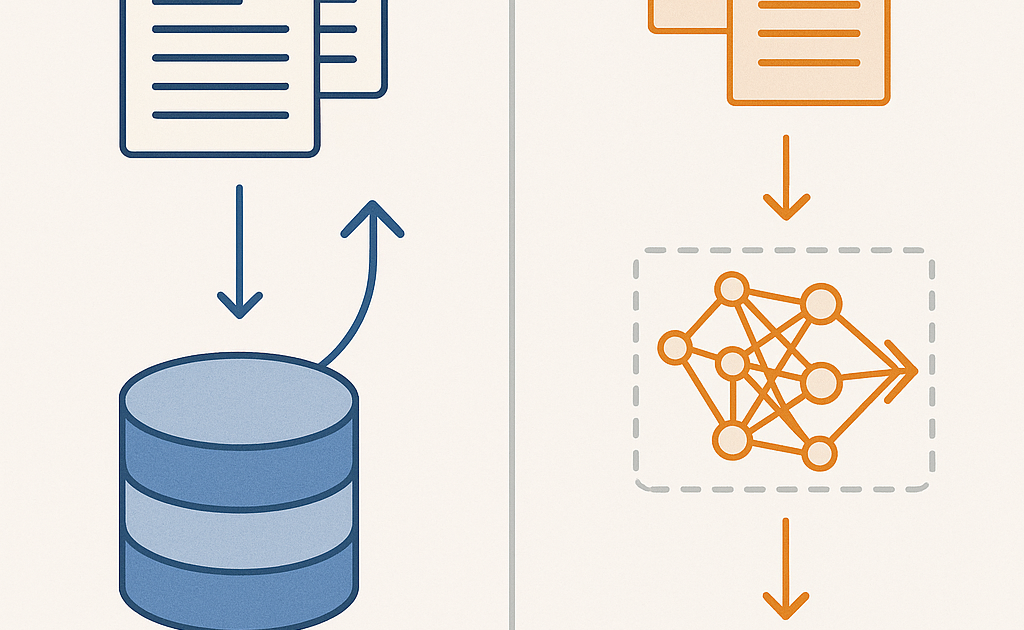
RAG (Retrieval-Augmented Generation) and Fine-Tuning solve different problems. RAG adds external knowledge to an LLM at query time by retrieving relevant documents — no model changes needed. Fine-Tuning updates the model’s weights by training it on new data to change its behavior or knowledge. Use RAG when you need up-to-date information, private data, or don’t have training resources. Use Fine-Tuning when you need the model to follow a specific style, format, or domain pattern.
They’re not mutually exclusive — many production systems use both.
Introduction
If you’ve spent any time building with LLMs, you’ve faced this question: should I give my model my data through RAG, or should I fine-tune it?
Both approaches let you customize an LLM with your own information. But they work fundamentally differently, and choosing wrong costs you time, money, and performance.
I’ll walk you through exactly how each works, when to use each, and — most importantly — how to combine them for the best results.
Practical Build: By the end of this article, you’ll build a document Q&A system that uses RAG for factual lookup and fine-tuning for response style — demonstrating both techniques in a single application.
What Is RAG?
RAG stands for Retrieval-Augmented Generation. It works by retrieving relevant information from a knowledge base and giving it to the LLM as context at query time. The model doesn’t change — it just gets better instructions with better information.
How RAG Works
- Prepare documents: Split your documents into chunks (usually 256-1024 tokens each)
- Create embeddings: Convert each chunk into a vector using an embedding model
- Store vectors: Store them in a vector database (ChromaDB, Pinecone, Weaviate)
- Receive query: User asks a question
- Embed the question: Convert the question into a vector using the same embedding model
- Search: Find the document chunks with vectors closest to the question vector
- Augment: Insert the retrieved chunks into the LLM prompt as context
- Generate: The LLM answers using both its training and the provided context
RAG at a Glance
- Model changes: None. The base LLM stays untouched
- Data freshness: Instant. Update your vector database, and the next query uses new info
- Cost per query: Embedding + retrieval + LLM generation (typically $0.001-$0.01 per query)
- Setup complexity: Moderate — requires a vector database, embedding pipeline, and retrieval logic
- Knowledge control: High — you know exactly which documents were used
- Best for: Factual Q&A, up-to-date information, private data, large document collections
What Is Fine-Tuning?
Fine-tuning takes a pretrained LLM and continues training it on your data. This updates the model’s weights, permanently changing how it behaves and what it knows.
How Fine-Tuning Works
- Prepare training data: Create a dataset of input-output pairs in the format your model expects (e.g., JSONL with prompt-completion pairs for OpenAI)
- Choose a base model: Select a pretrained model (GPT-4o mini, Llama 3, Mistral, etc.)
- Train: Run training loops where the model learns to match your outputs from your inputs
- Evaluate: Test the fine-tuned model on data it hasn’t seen
- Deploy: Host your fine-tuned model and serve it
Fine-Tuning at a Glance
- Model changes: Permanent. The weights are updated
- Data freshness: Frozen at training time. Retraining required for new data
- Cost per query: Same as base model inference (typically $0.003-$0.06 per query for hosted models)
- Setup complexity: High — requires training infrastructure, ML expertise for best results
- Knowledge control: Low — you can’t trace which training examples influenced a specific output
- Best for: Format control, tone/style adaptation, domain-specific patterns, reducing prompt length
Key Differences at a Glance
Aspect vs RAG vs Fine-Tuning:
Updates model weights? No | Yes
Data can change without retraining? Yes | No
Requires training compute? No | Yes (GPUs/TPUs)
ML expertise needed? Basic | Intermediate-Advanced
Traceable knowledge? Yes (show source docs) | No (black box)
Hallucination risk? Lower (grounded in context) | Higher (relies on learned patterns)
Deployment complexity: Mid + vector DB | High + model hosting
Best use case: Q&A over documents | Style/format adaptation
When to Use RAG
1. You Have Dynamic or Updated Data
If your knowledge base changes frequently — product catalogs, news articles, user manuals — RAG is the obvious choice. Update the vector database, and your system instantly knows about new information. No retraining, no redeployment.
2. You Need Factual Accuracy and Traceability
RAG lets you show the user exactly which documents the answer came from. This is critical for medical, legal, financial, or any high-stakes applications where you need to verify answers against source material.
3. You Have Large Document Collections
Training on millions of documents is expensive. RAG scales with your vector database — you can index gigabytes of documents and retrieve from them in milliseconds.
4. You Don’t Have ML Resources
RAG requires no training infrastructure, no GPU, no ML engineers. Any developer with API access can build a RAG system.
When to Use Fine-Tuning
1. You Need Consistent Output Format
If every response needs to follow a specific template — JSON schema, custom tags, structured data — fine-tuning is better than telling the model the format in every prompt.
2. You Want to Reduce Prompt Length
Fine-tuning builds the behavior directly into the model weights. This means shorter prompts = lower costs and faster responses. For high-volume applications, this saves significant money.
3. You Need Domain-Specific Style or Tone
Legal writing. Medical reports. Technical documentation with specific terminology. Fine-tuning teaches the model these patterns so it uses them naturally without needing examples in every prompt.
4. The Model Needs to Think Like Your Domain
Some domains have unique reasoning patterns. A fine-tuned model on scientific papers doesn’t just know more facts — it approaches questions with scientific reasoning patterns.
Combining RAG and Fine-Tuning: The Best of Both
Production AI systems rarely use just one. The most effective approach is:
- Fine-tune a base model on your domain’s writing style, format preferences, and output structure
- Implement RAG on top of the fine-tuned model to provide factual knowledge at query time
The fine-tuned model writes naturally in your style. The RAG system keeps it accurate with current data. Together, you get a model that sounds right and is right.
Practical Build: Document Q&A with RAG + Fine-Tuning
Let’s build a system that uses both approaches.
Step 1: Prepare Your Fine-Tuning Dataset
Create a JSONL file with examples of how you want the model to respond:
{"messages": [{"role": "system", "content": "You are a technical support assistant. Answer concisely with specific citations from the documentation."}, {"role": "user", "content": "How do I reset my password?"}, {"role": "assistant", "content": "Go to Settings > Account > Reset Password. A confirmation email will be sent to your registered address. [Source: Account Management Guide, Section 2.1]"}]}
Prepare 50-100 such examples covering different scenarios.
Step 2: Fine-Tune
Use OpenAI’s fine-tuning API:
curl -X POST https://api.openai.com/v1/fine_tuning/jobs -H "Authorization: Bearer $OPENAI_API_KEY" -d '{"model": "gpt-4o-mini-2024-07-18", "training_file": "file-xyz", "suffix": "support-style"}'
Step 3: Build the RAG Pipeline
Set up ChromaDB with your documentation indexed:
import chromadb; client = chromadb.PersistentClient(path="./doc_db"); collection = client.get_or_create_collection("support-docs")
Index your documents and implement a retrieve function that queries the collection by vector similarity.
Step 4: Combine Them
Query your fine-tuned model with RAG context in the prompt. The fine-tuning handles the style; RAG provides the facts. The result is responses that sound right and are right.
Decision Framework
Still unsure? Answer these questions:
- Does your data change? Yes → Use RAG. No → Could use either.
- Do you need to cite specific sources? Yes → Use RAG. No → Could use either.
- Do you need a specific output format? Yes → Fine-tune for it.
- Are prompts getting too long? Yes → Fine-tune to shorten them.
- Can you afford training infra? No → Use RAG.
- Do you need both style and facts? Yes → Use both together.
Frequently Asked Questions
Q: Can RAG replace fine-tuning entirely?
A: For most knowledge-based applications, yes. RAG handles the vast majority of use cases where you need an LLM to use your data.
Q: Can fine-tuning replace RAG?
A: Not safely. Fine-tuning cannot reliably memorize specific facts. It learns patterns, not databases.
Q: Which is cheaper?
A: RAG is cheaper initially (no training cost). At very high query volumes, fine-tuning can be cheaper per query because prompts are shorter.
Q: How long does fine-tuning take?
A: With modern APIs, 1-3 hours for small datasets. With LoRA and a good GPU, 15-30 minutes.
Q: How much data do I need for fine-tuning?
A: 50-100 high-quality examples for style/format. 500-1000+ for domain adaptation.
Q: Does RAG add latency?
A: Typically 50-200ms for retrieval — usually negligible compared to LLM generation time.
Conclusion
RAG and fine-tuning are not competing approaches — they’re complementary. RAG gives your model access to fresh, traceable knowledge. Fine-tuning teaches your model how to think and write in your specific domain. Used together, they produce AI systems that are both knowledgeable and stylistically consistent.
Start with RAG. Add fine-tuning only when you hit limitations RAG can’t address.