Quick Answer
Cursor AI Agent Mode is an experimental feature that gives Cursor’s AI full terminal and filesystem access so it can write, test, and iterate on code autonomously. I used it to build a complete subscription billing dashboard with FastAPI, SQLite, JWT auth, and Tailwind CSS in about three hours. It worked surprisingly well but hit real limits on debugging and edge cases.
Introduction
I have been using AI coding tools since GitHub Copilot first launched. I know what they can do and more importantly what they cannot do. Autocomplete for boilerplate is nice. Chat-based code generation saves time. But every tool still forces me to stay in the driver’s seat. I write the plan. I fix the bugs. I connect the pieces.
Then I heard about Cursor AI Agent Mode. The pitch is simple. You describe what you want built, and the AI opens your files, edits them, runs terminal commands, checks for errors, and tries again. It sounded like a sales demo fantasy. So I decided to test it with a real project that would expose every weak spot.
I asked Cursor Agent Mode to build a full SaaS subscription management app from scratch. No starter template. No handholding. Just a prompt and a blank folder. Here is what happened.
What Is Cursor Agent Mode?
Cursor is best known as a code editor built on VS Code with deep AI integration. The normal chat mode lets you ask questions and get code snippets you paste yourself. The composer mode generates multi-file edits but leaves you to review and apply them manually.
Agent Mode is the next step. It gives the AI three capabilities that earlier modes lacked.
First, it can read and write any file in your project without you copying code back and forth. Second, it can run terminal commands directly. This means it can install packages, run the server, and see error output in real time. Third, it can iterate. When something fails, it reads the error, adjusts its approach, and tries again without you asking.
This loop changes the workflow. Instead of generating code you still have to integrate and debug, you describe the goal and the AI chips away at it until the goal is met. You can review each step or let it run autonomously for a stretch.
Agent Mode is still experimental. It is available in Cursor’s preview builds and you need to enable it in settings. It is not perfect. But it represents a real shift from AI as a copilot to AI as a junior developer who can be pointed at a task and left alone for a bit.
The Challenge: Build a SaaS App From Scratch
I wanted a project that would stress test every part of the agent. Building a landing page with three sections is one thing. Building a multi-page web application with authentication, database models, CRUD workflows, and financial calculations is another.
I chose a subscription billing dashboard. It had to include user signup and login with secure password hashing, session management via JWT tokens, subscription plan creation and editing, customer management with plan assignment, invoice tracking, and a dashboard showing MRR (monthly recurring revenue), active subscriber counts, and churn metrics. I also wanted Stripe integration in test mode and seed data for quick demos.
This is a standard SaaS backend. Nothing fancy. But it touches every layer of a web application from database schema to form handling to template rendering. If Agent Mode could build this without falling apart, it would prove something real.
Step 1: Planning and Project Setup
I created an empty folder called cursor-saas and opened it in Cursor. I switched to Agent Mode using the dropdown in the chat panel. Then I wrote my first prompt.
“Build a SaaS subscription management dashboard with Python FastAPI, SQLite, Jinja2 templates, and Tailwind CSS. I need user auth with JWT tokens, plan management, customer subscriptions, invoice tracking, a dashboard with MRR and churn metrics, and optional Stripe integration. Give me the full project structure.”
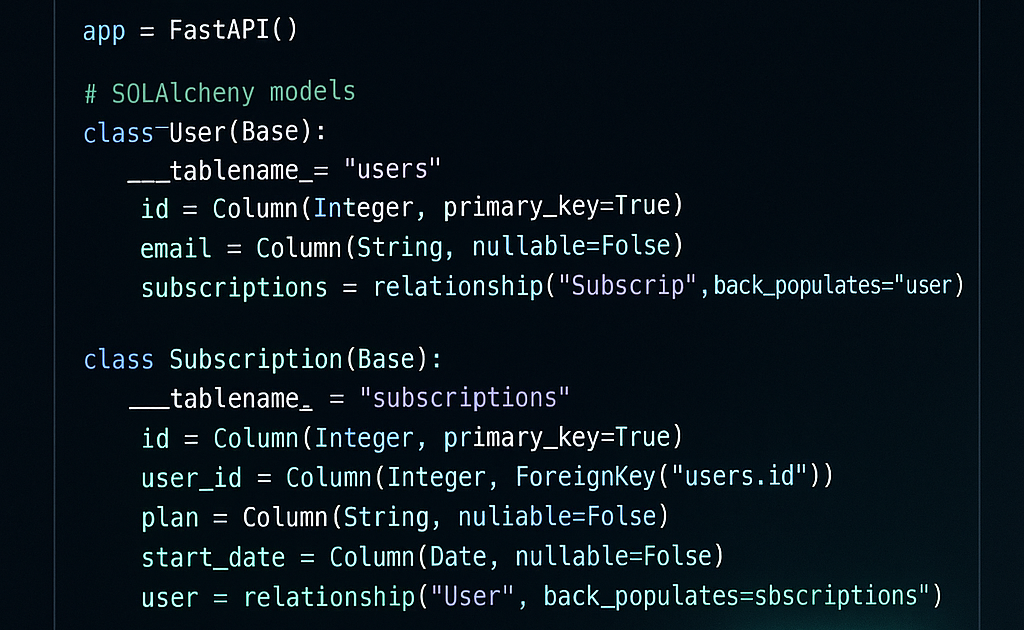
The agent started immediately. It created main.py, set up the FastAPI app skeleton, and defined all four database models (User, SubscriptionPlan, Customer, Invoice) using SQLAlchemy. It generated requirements.txt with all the dependencies. It created the templates directory and the static folder.
I watched it work. The chat panel showed each action. “Creating main.py”. “Writing User model”. “Adding auth utilities”. “Creating login template”. It moved fast, about two file creations per minute. After about five minutes I had a project structure that looked like a real FastAPI app.
Step 2: Building the Core Features
After the skeleton was in place, I asked for specific features one at a time. This turned out to be the right rhythm. Large monolithic prompts worked poorly. Small focused prompts worked well.
I started with authentication. “Add user registration, login, and logout with JWT tokens stored in cookies.” The agent created the password hashing utilities using passlib with bcrypt. It set up JWT creation and verification using python-jose. It generated the login, register, and logout routes. It created the login.html template with a clean form and the register.html template with name, email, and password fields.
Next I added plan management. “Let users create subscription plans with a name, description, price, and billing interval. Add a toggle to activate or deactivate plans.” The agent added the plans listing page, a create form with POST endpoint, and the toggle route.
Customer management came next. The agent added a customers page showing all subscribers with their assigned plan, status, and creation date. It created the form to add new customers with a dropdown to select a plan. It also added the cancellation endpoint. The interesting part was how the agent decided to generate an invoice automatically when a customer was created. I did not ask for that. It inferred the invoice generation from the domain model.
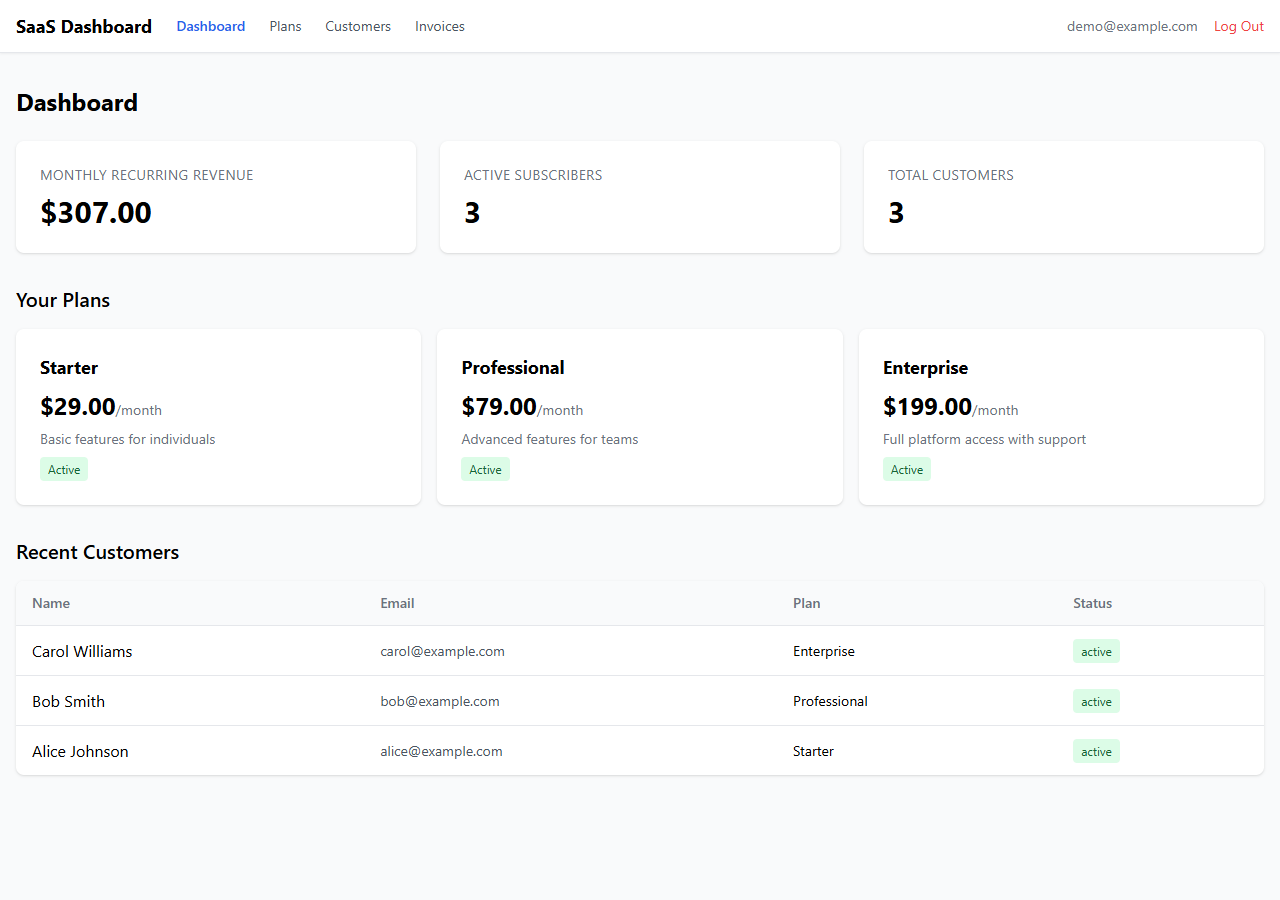
The dashboard was the most complex piece. I asked for MRR calculation, active subscriber count, total customers, and churn rate. The agent queried active customers, summed their plan prices in cents, and divided by 100 for dollar display.
The Final Dashboard
After about three hours of iterative prompting and occasional manual guidance, here is what the app looked like running on localhost:
Where It Broke Down
I want to be honest about the failures because the marketing demos never show them. Agent Mode is impressive but it breaks in predictable ways.
The first problem was template rendering. About half the time the agent generated a Jinja2 template with incorrect variable references. It would reference a variable name that did not exist in the route handler. These errors only showed up when I ran the server and navigated to the page. The agent could not pre-validate template variables against the Python context.
The second problem was form handling. Agent Mode sometimes created form fields that did not match the POST endpoint parameters. A form might submit a field called description while the endpoint expected desc. The error message from FastAPI was clear enough but the agent’s fix attempts sometimes introduced new mismatches.
The third problem was the Stripe integration. I wanted optional Stripe support with a graceful fallback. The agent assumed Stripe was fully configured and would crash if the API keys were missing. I had to explicitly prompt it to add a conditional check.
The fourth problem was debugging loops. When the server threw a 500 error, the agent would read the traceback and make a fix. Sometimes the fix worked. Sometimes it introduced a new error in a different file. A few times it entered a cycle of fix, fail, fix, fail that I had to interrupt by giving more specific instructions.
Tips for Using Cursor Agent Mode Effectively
After this experiment, I have a few practical takeaways.
Break your project into small prompts. One large prompt for the whole app gets about sixty percent right and the debugging takes longer than incremental prompting would have. Give one feature at a time and verify it works before moving on.
Run the server frequently. The agent cannot see errors it cannot detect. Start the application after each feature and navigate through the pages. When something breaks, paste the exact error into a follow-up prompt.
Be specific about edge cases. The agent will not ask clarifying questions. If you want graceful fallbacks, error handling, or input validation, you need to include that in your prompt.
Review generated templates carefully. Template variables are the most common source of silent bugs. Check that every variable in your HTML template matches a key in the context dictionary passed to TemplateResponse.
Frequently Asked Questions
Q: Is Cursor Agent Mode free?
A: Cursor Agent Mode requires a Cursor Pro subscription ($20/month). The free tier only includes basic chat and composer features.
Q: Can Agent Mode build an entire app without any human input?
A: Not really. It can generate a lot of working code autonomously, but you still need to guide it on architecture decisions, fix template variable mismatches, and handle edge cases it did not think of.
Q: What tech stacks work best with Agent Mode?
A: It works best with popular, well-documented stacks. Python FastAPI and Next.js are strong choices because the AI training data includes many examples of these frameworks.
Q: How long did it take to build the SaaS app with Agent Mode?
A: About three hours for the full 1750-line application. Writing this from scratch would have taken me a full day. Building the same app with regular Copilot or chat-based AI would have taken about six to eight hours.
Q: Does the generated code have security issues?
A: It can. The agent generated hardcoded JWT secrets, basic password validation, and minimal input sanitization. You should review all security-relevant code before deploying anything built with Agent Mode to production.
Q: Will Agent Mode replace developers?
A: No. It is a productivity tool, not a replacement. It handles boilerplate generation and routine CRUD patterns well. It struggles with novel problems, architecture decisions, debugging complex interactions, and security hardening.
Conclusion
Cursor AI Agent Mode is not magic. It cannot build a production-ready SaaS app on its own. But it is genuinely useful for the early stages of a project when you need to go from nothing to something functional as fast as possible.
The three-hour build time is about three times faster than my manual pace. The code quality is acceptable for a prototype. The debugging friction is real but manageable if you know what to watch for.
I will keep using Agent Mode for prototyping and rapid iteration. I will not trust it for production code without thorough review. That tradeoff feels right for where AI code generation is today.